

- 最終更新
- 2026/08/17
3秒でわかる
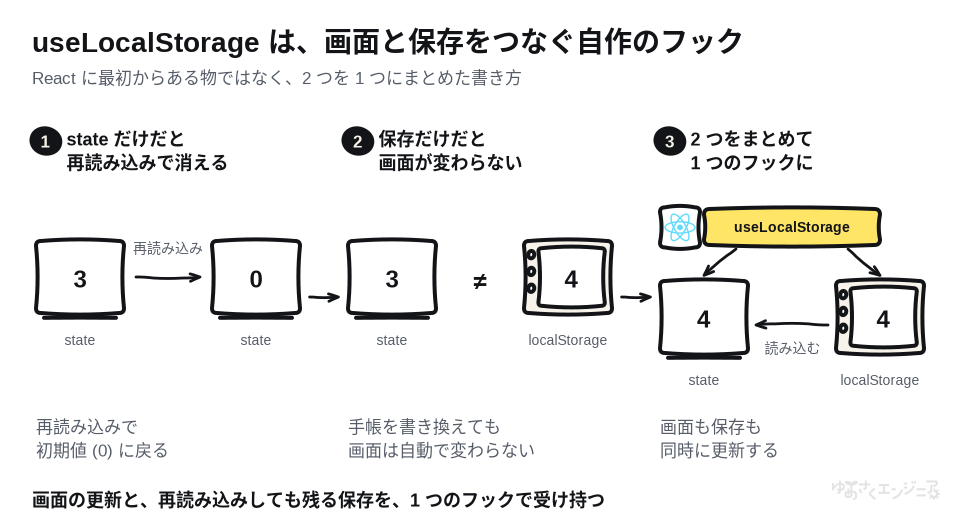
React の状態や副作用の処理をまとめて取り出した、use で始まる自作の関数。同じ処理を複数の部品で使い回し、画面の記述を短く保つために作ります。
30秒図解


もう少し詳しく
どういうものか
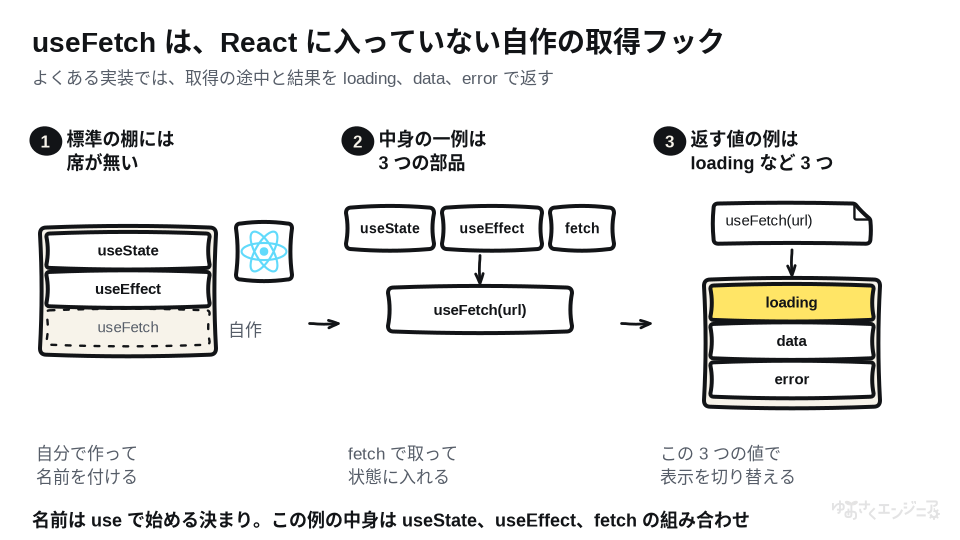
カスタムフックは、useState や useEffect をuse で
重要なのは、
なぜ必要か
データ取得を
具体例
import { useState, useEffect } from "react";

export function useFetch(url) {
  const [data, setData] = useState(null);
  const [loading, setLoading] = useState(true);
  const [error, setError] = useState(null);

  useEffect(() => {
    let alive = true;
    setLoading(true);

    fetch(url)
      .then((r) => {
        if (!r.ok) throw new Error("status " + r.status);
        return r.json();
      })
      .then((json) => alive && setData(json))
      .catch((e) => alive && setError(e))
      .finally(() => alive && setLoading(false));

    return () => { alive = false; };
  }, [url]);

  return { data, loading, error };
}

function MemberList() {
  const { data, loading, error } = useFetch("/api/members");
  if (loading) return <p>読み込み中</p>;
  if (error) return <p>取得に失敗しました</p>;
  return <ul>{data.map((m) => <li key={m.id}>{m.name}</li>)}</ul>;
}
つまずきやすいところ
名前を use で
もう 1 つは、if の
似た用語との違い
ただのuse を
覚え方
「画面の